From Notebooks to Databases: Digitizing a Family Business
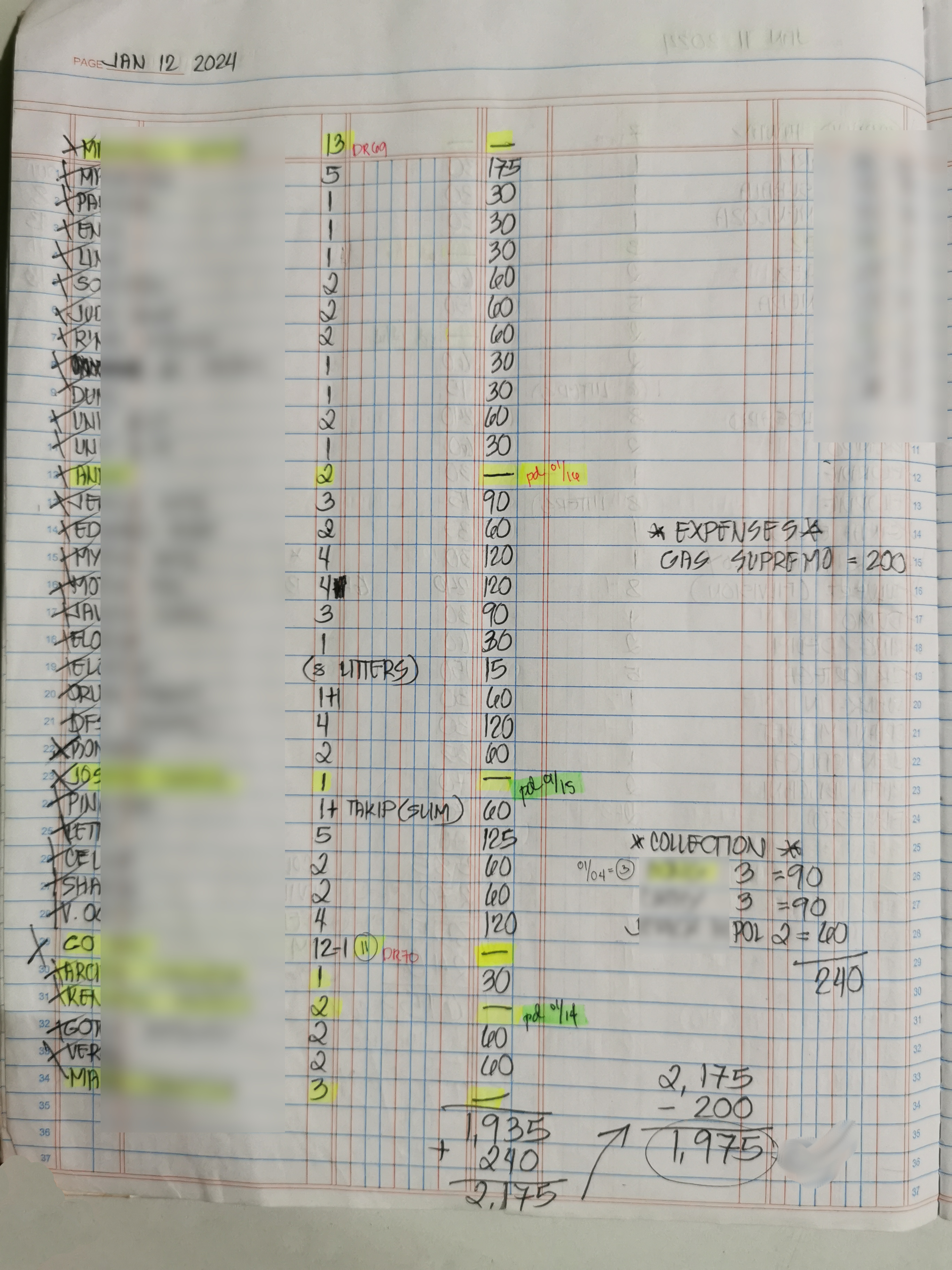
Imagine three delivery personnel, each carrying their own notebooks. Each notebook has roughly 25 entries per page. Multiply that by 26 days a month. That's how much data was being written—by hand, every single month.
Let's do the math:
1,950+ entries per month. Every single one handwritten. Every single one that needed to be searched manually when checking for unpaid orders.
This was a small family business drowning in paper, where finding last week's unpaid orders meant flipping through hundreds of handwritten entries across multiple notebooks, hoping nothing got missed.
The Paper Trail
Here's how it actually worked: when the business needed to check for unpaid orders, employees would manually flip through multiple notebooks—page after page of handwritten entries—to identify who still owed money. Then they'd write it all down on paper again.
You're probably asking: "Why deliver to customers with unpaid orders in the first place?"
Fair question. But this wasn't poor business practice. It was the reality where customers weren't always home when delivery arrived. Some preferred to pay weekly or monthly instead of per-delivery. Some had standing agreements to settle invoices at month-end. This niche industry required flexibility, and rigid "no payment, no delivery" policies would have cost more customers than they protected against losses.
Besides, when the business runs dozens of deliveries per day and individual orders are ₱30, waiting around for every single payment would kill their throughput. They'd spend more time collecting than delivering. In water refilling stations, volume matters more than immediate payment.
But the problem wasn't the payment terms. The problem was that tracking those terms relied entirely on handwritten notebooks and human memory.
The Real Cost
When I started this project, I couldn't tell exactly how much money was sitting in unpaid orders—even the employees who managed deliveries were unsure. That information was scattered across those 1,950+ monthly entries in three different notebooks. The business has been operating for more than a decade, that's a lot of data to sift through manually.
Want to know the real cost breakdown?
- Time: Hours spent manually searching through notebooks every week
- Errors: Missed payments, duplicate entries, lost orders that were never followed up
- Lost Revenue: Orders that aged out because nobody tracked them systematically—and customers who stopped ordering entirely
- Stress: The constant anxiety of not knowing the full picture
It wasn't until after deploying the database that I could finally run the numbers. The result? Over ₱250,000 in unpaid orders that the paper system couldn't properly track or surface. That's not a typo—a quarter million pesos just... sitting there, invisible to the manual process.
What's more painful was that some of those customers had already stopped ordering from us. Employees were flabbergasted—they genuinely thought certain customers were reliable payees. Turns out, they'd missed tracking dozens of unpaid orders. Not because the employees were careless, but because the written system made it impossible to maintain an accurate picture.
The Human Side: Resistance to Change
The hardest part of digitizing a family business isn't the technology—it's convincing people who've run the business successfully for years that change is necessary.
The business was managed by a senior citizen who had zero experience with technology. This is the reality of small businesses in the Philippines. You can talk about Odoo, QuickBooks, or whatever off-the-shelf solution exists, but those tools weren't built for this specific workflow. The features were either too bloated with unnecessary functionality or missing the exact order management capabilities the business actually needed. Water refilling stations have unique delivery patterns and payment terms that generic solutions don't handle well.
Try explaining to someone who's been successfully managing orders with notebooks for decades why they should trust a computer system.
"What if the computer breaks?"
"What if we lose the data?"
"This has worked fine for years, why change now?"
"The paper system works. Why do we need this computer thing?"
These weren't unreasonable concerns—they were legitimate questions from someone whose entire business literacy was built on physical, tangible records. But a database? That's an abstract concept for non-tech people.
The breakthrough came when I could finally show them the numbers, and payment collections became more frequent. That's when "this computer thing" became less abstract and more "Oh no, we've been bleeding money and didn't even know it. 👁👄👁"
The Digitization Process
Step one: build a spreadsheet. Not a database yet—just Excel. Figure out what columns I needed, create a separate sheet for customer data, set up vlookups to connect everything. Then came the grunt work of manually typing every single entry from those notebooks into the spreadsheet.
Every. Single. Entry.
The biggest nightmare? Customer name redundancy. The same customer would be written three different ways across different notebooks such as "Juan Dela Cruz," "J. Dela Cruz," "Juan DC." Sometimes just a nickname, or a surname. No consistency. No unique identifiers. Just whatever the delivery person scribbled down that day.
I'd have to go back to the employees constantly: "Is this the same person?", "What's their address?" "Do you know their full surname?"
The employees were tracking customers purely through memory. They'd recognize names or partial names and just... remember who lived where and who owed what.
Which is impressive, honestly. But also completely unacceptable when you're trying to build a system. Systems need unique identifiers, consistent naming, structured data. Human memory doesn't scale. You can't query memory. You can't aggregate memory. You can't generate reports from memory.
So I spent weeks (even months!) cleaning data, consolidating duplicate customer records, standardizing names, and building the foundation that would eventually become a proper database. The tedious work nobody sees but absolutely necessary work for anything else to function.
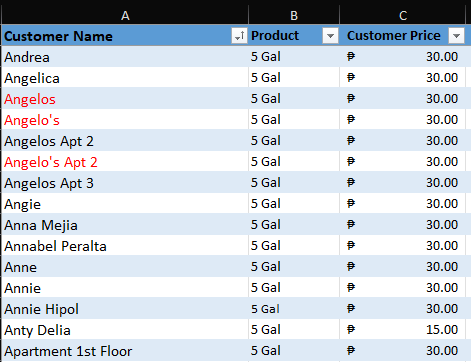
Notice "Angelos" vs "Angelo's" vs "Angelo's Apt 2" vs "Angelos Apt 2" vs "Angelos Apt 3". Are "Angie," "Anne," and "Annie" three different people or variations of the same customer? And my personal favorite: "Apartment 1st Floor"—zero context about which building, which street, which barangay. This was the system for over a decade. Yes, the business somehow survived this mess.
The Outcome
Six months of manual data entry to digitize over a year's worth of orders. I had to choose: keep going back five years or focus on recent orders and start collecting payments now. I chose speed over completeness.
Once the data was in the system, I could generate proper statements—full audit trails showing every order, every payment, every outstanding balance. Most customers paid when presented with documented proof.
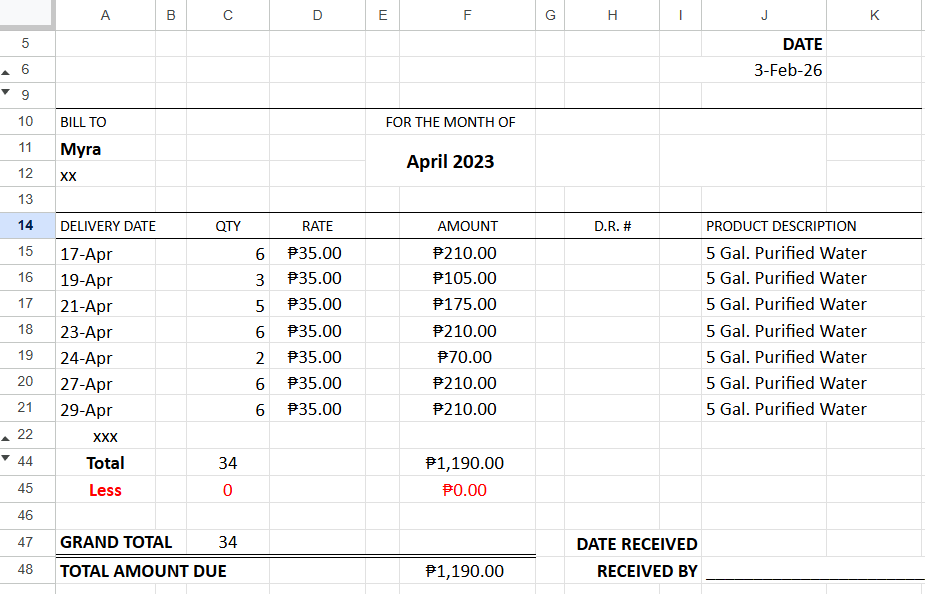
But some customers didn't want to pay. Some stopped ordering entirely rather than settle their accounts. That ₱250,000 in unpaid orders? Not all of it was recoverable. Some of that money was gone—written off as the cost of not having a system in place sooner.
Eventually, I found a secretary to handle the day-to-day data entry. That freed me up to focus on what came next: migrating everything from Excel to a proper MySQL database. The spreadsheet got us operational, but it wasn't the final solution. It was the bridge to get there.
Lessons Learned
The biggest lesson: systems must adapt. But this doesn't mean we have to dismiss the old workflow but we have to identify what needs to change. The business already outgrew what manual tracking could handle and the modernization proved that the business was losing a lot of revenue.
You don't have to modernize everything. The business still uses written orders because that's what the manager and employees understand and trust. Those orders still get entered into the database. Redundant? Sure. But the written orders can't be totally removed... yet. It's like banks still running COBOL. Sometimes the cost and risk of full modernization outweighs the benefit.